
Laravel Socialite is a package that simplifies authentication with OAuth providers such as Google, Facebook, Twitter, GitHub, and more. Instead of manually handling OAuth flows, Socialite provides a clean, fluent interface to authenticate users in Laravel applications.
📌Why Use Laravel Socialite?
- Ease of Use: Reduces boilerplate code for OAuth authentication.
- Supports Major Providers: Integrates with popular services like Google, Facebook, GitHub, LinkedIn, and more.
- Extensibility: Allows adding custom OAuth providers if needed.
Installation 🛠️⚙️📥
To install Laravel Socialite, use Composer: composer require laravel/socialite
Next, register the Socialite service provider in config/app.php (for Laravel 8 and below). In Laravel 9 and later, it is automatically registered.
Add the Socialite facade to your aliases (optional if using Laravel 9+):

Configuring OAuth Providers🔐🔗🛡️
To use Socialite, you need API credentials from the provider. Add these to your .env file:

Then, configure the provider in config/services.php:

📲Implementing Social Authentication🔑
Creating Authentication Routes🔄
Define authentication routes in routes/web.php:
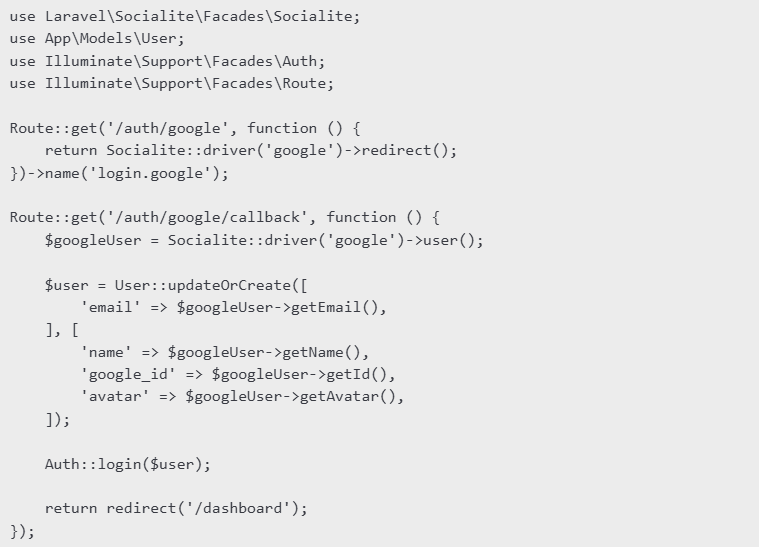
Explanation🧐✅
/auth/google– Redirects users to Google’s OAuth consent screen./auth/google/callback– Handles the response, retrieves user data, and logs them in.updateOrCreateensures existing users are updated while new users are created.
📢Handling Authentication in Controllers
For better structure, use a controller instead of defining logic in routes:
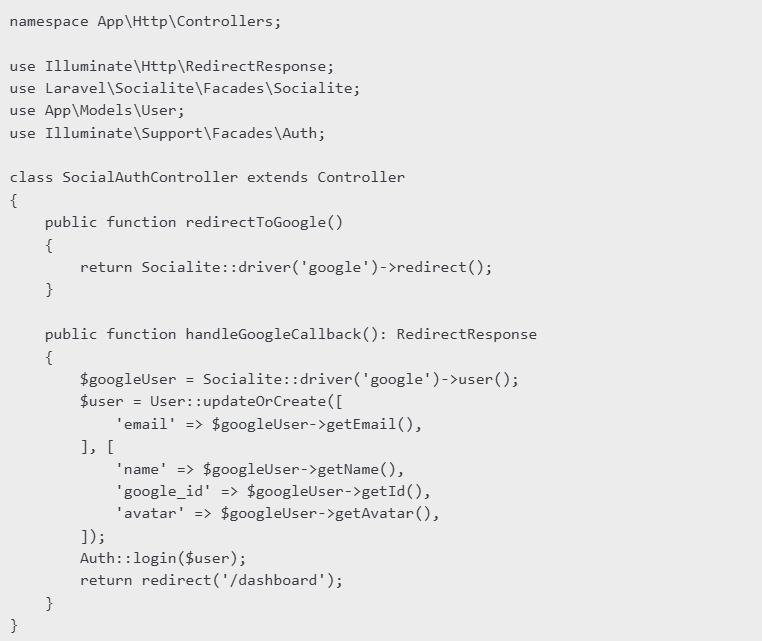
Now, update routes/web.php to use the controller:
use App\Http\Controllers\SocialAuthController;

Route::get('/auth/google', [SocialAuthController::class, 'redirectToGoogle']);
Route::get('/auth/google/callback', [SocialAuthController::class, 'handleGoogleCallback']);
📂Adding Login Button in Blade View
To add a Google login button in a Blade template (resources/views/auth/login.blade.php):

Logging Out Users🔚
To allow users to log out, define a logout route:

Then, add a logout button:

Laravel Socialite makes OAuth authentication effortless by handling provider interactions and user management with minimal code. By following this guide, you can easily integrate social authentication into your Laravel applications, improving the user experience with seamless login options.