
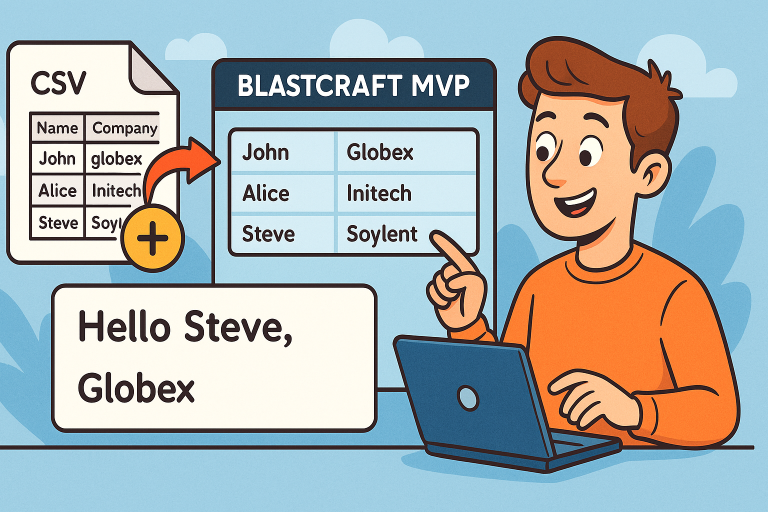
In today’s update, we tested a small but powerful enhancement to the Blastcraft CSV — adding a new variable called Company Name that can now be used across templates, CSV uploads, and manual entries.
This new feature helps personalize communication even further, allowing users to include not just a recipient’s name but also their company information directly in messages and templates.
🧠 What Was the Task?
The task was simple at first glance:
“Add a new variable —
company name— and make sure it appears as a column in the CSV upload.”
However, to make this work seamlessly across the system, the variable had to be properly integrated into:
- CSV imports and parsing logic;
- Manual input forms;
- Dynamic email templates;
- Reports and logs.
⚙️ Step-by-Step Test
- CSV Setup
The test started with preparing a CSV file containing three columns:- Name
- CompanyAfter adding sample company names and saving the file, it was uploaded into the system. The upload worked perfectly — the Company field appeared instantly in the preview.
- Manual Input
Next, a manual test was performed by adding a new contact directly inside Blastcraft MVP.- The company name field appeared as expected.
- The new entry was saved without errors.
- Template Integration
Once the variable was confirmed in the database, it was time to integrate it into the email template.
The new variable could be added dynamically after the H1 title, allowing each outgoing message to include both the user’s name and company — a small detail that makes every communication feel more personalized and professional. - Verification and Report
The final check was performed via system reports:- All five test messages were sent successfully.
- Each message displayed correctly with the company variable filled in.
- The dark mode version was checked for visual consistency.
✅ Results
Everything worked as planned — the Company Name variable now functions across all workflows:
- CSV imports
- Manual contact creation
- Email templates
- Reports
The test concludes with full confirmation that the new variable performs flawlessly and can be safely used in production.
💡 Why It Matters
Adding company data as a dynamic variable is a big step toward more personalized and automated communication.
It opens the door for:
- Tailored email templates (“Hello Steve from Skynix!” 😎)
- Cleaner imports from CRM data
- Better segmentation in reports
Small update — big impact.
📩 Final Thoughts
The Blastcraft CSV team continues improving usability and automation features one step at a time. This update might look minor, but personalization is key to meaningful communication.
Every variable counts.