
Growing from one online shop to many is a great problem to have—until you’re juggling different dashboards, logins, taxes, inventories, and analytics. If that sounds familiar, you’re exactly who Magento Multi-Store was built for.
Below is a clear, practical walkthrough of how Magento handles multi-store ecommerce, why it’s different from multi-vendor marketplaces, and when it beats “separate site” approaches like Shopify Plus expansion stores.
🧭 A real example: two shops, one brain
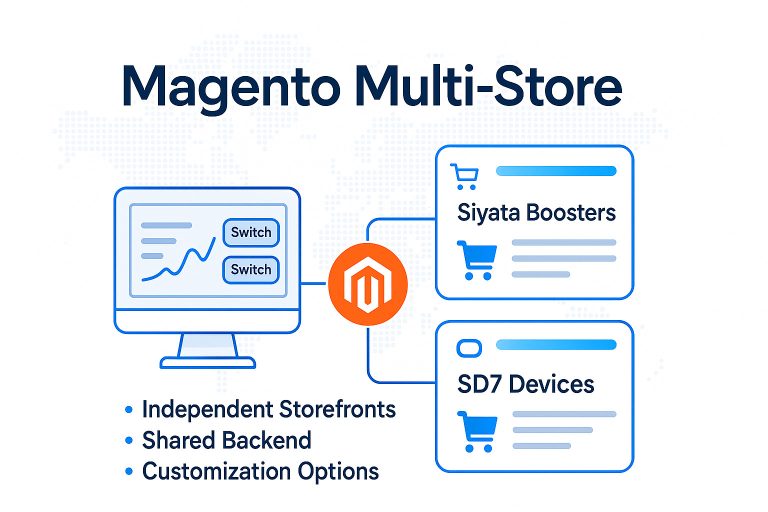
Imagine you operate two distinct ecommerce brands:
- Siyata Boosters — advanced cellular signal solutions
- SD7 Devices — rugged push-to-talk communication handsets
Each storefront has its own domain, design, catalog, pricing, and language. Yet both share the same backend for inventory, orders, customers, and integrations. From one Magento admin, you switch between stores in a click, manage products once, and keep analytics unified.
Result: no duplicate maintenance, no sync errors, and no spreadsheet acrobatics.
💡 What is Magento Multi-Store?
Magento Multi-Store lets one company run multiple independent storefronts from a single Magento installation and admin. You can vary:
- Branding & themes per site
- Catalogs (shared, overlapped, or entirely different)
- Prices, taxes, and promotions
- Languages & currencies
- Domains & SEO structure
Under the hood, stores share the same core system, extensions, and integrations. One software update applies to all stores, and your marketing data and reports roll up cleanly across the portfolio.
🚀 Why teams love it
- One login, unlimited stores – centralize control without losing brand independence
- Shared data where it matters – customers, inventory, and orders stay in sync
- Unified analytics – cross-brand reporting without exporting and stitching
- Lower total effort – maintain once, benefit everywhere
- Enterprise-grade flexibility – fine-tune checkout, taxes, and UX per store
🌍 Scale globally—without duplicating work
Expanding to the US, EU, and Asia? Magento Multi-Store lets each region have:
- Localized taxes & shipping rules
- Local currencies and price books
- Region-specific domains with SEO-friendly structures
- Localized content while reusing the same integrations and core catalog
You get truly local storefronts, backed by one operational engine.
🛍️ Multi-Store vs. Multi-Vendor (don’t mix them up)
- Multi-Store: your company runs multiple branded shops from one backend.
- Multi-Vendor: many independent sellers list and fulfill products inside your marketplace (think Amazon or Etsy).
Magento supports both models via core features and extensions, but Multi-Store is the right fit when you control the brands.
⚙️ Magento Multi-Store vs. Shopify Plus expansion stores
Shopify Plus offers “expansion” sites, but each is typically a separate backend. That often means:
- More logins and manual updates
- Extra overhead to sync products, customers, and inventory
- Parallel app management and higher total cost of ownership
Magento Multi-Store keeps one backend with unlimited stores, so platform updates, catalog changes, and shared integrations flow to every storefront automatically.
Choose Magento Multi-Store if you need to:
- Run multiple brands or regions with distinct catalogs or pricing
- Share inventory, customers, and integrations centrally
- Produce portfolio-level analytics across all stores
- Localize taxes, currencies, languages, and SEO per market
- Minimize duplicate content, logins, and maintenance
If most of these are “yes,” Multi-Store will likely pay for itself in saved time and fewer errors.
✍🏼 What setup looks like (at a glance)
- Plan your structure: websites → stores → store views (language/locale)
- Map domains & SEO: per-store URLs, sitemaps, and hreflang where needed
- Configure catalogs: shared vs. unique products and price scopes
- Localize commerce rules: taxes, shipping, payment methods per region
- Unify integrations: one set of extensions, ERP/CRM, and analytics for all
- Harden operations: roles/permissions, deployment pipeline, backup strategy
If you’re searching for the best multi-store ecommerce platform, Magento gives you one backend with full control over multiple independent storefronts. Customize each shop’s brand, catalog, pricing, language, and domain—while keeping inventory, customers, integrations, and reporting centralized. It’s how you scale globally without chaos.
👉 Contact Skynix https://skynix.co/ to learn how we can help you implement Magento Multi-Store and scale your brand the smart way